【VRChat】Counter Service|ドリンク注文・提供システム
- ダウンロード商品¥ 900
Counter Service | HEZ STUDIO v0.1.1
【日本語】
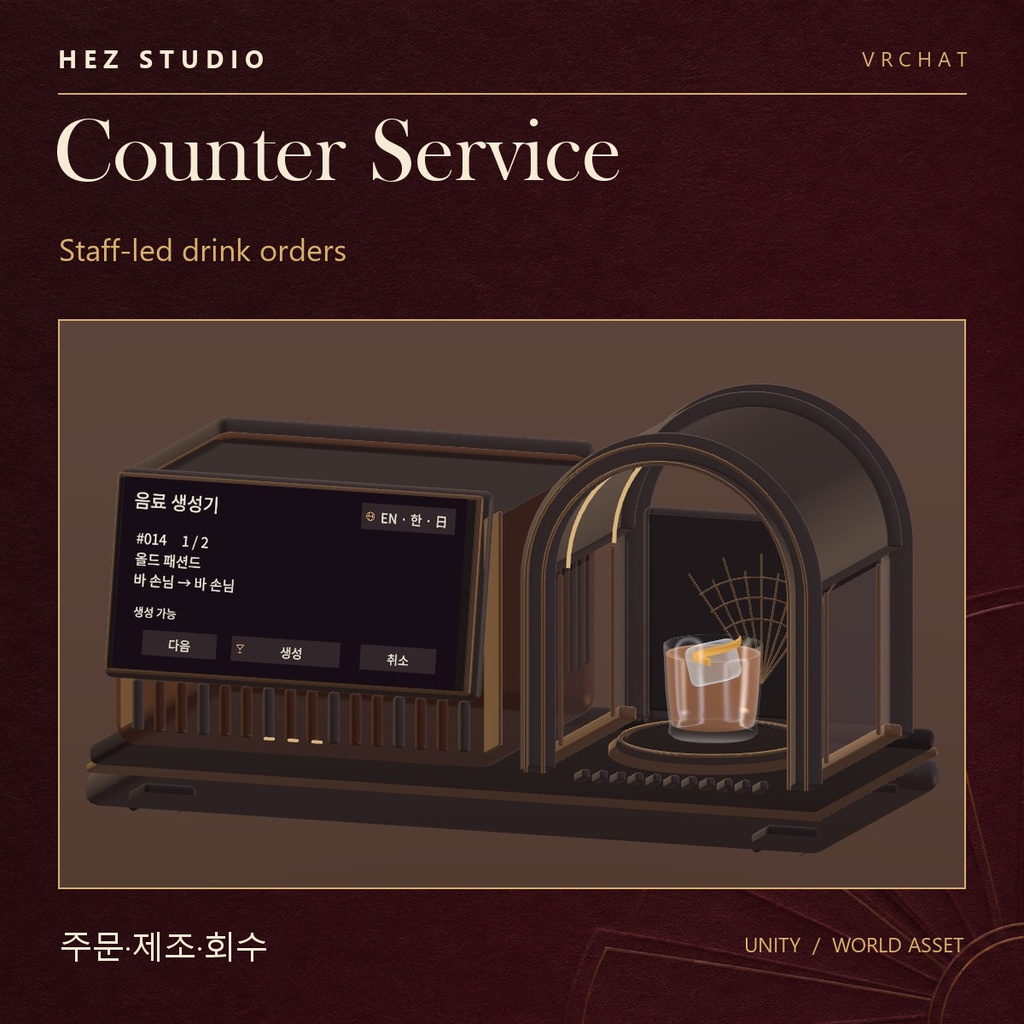
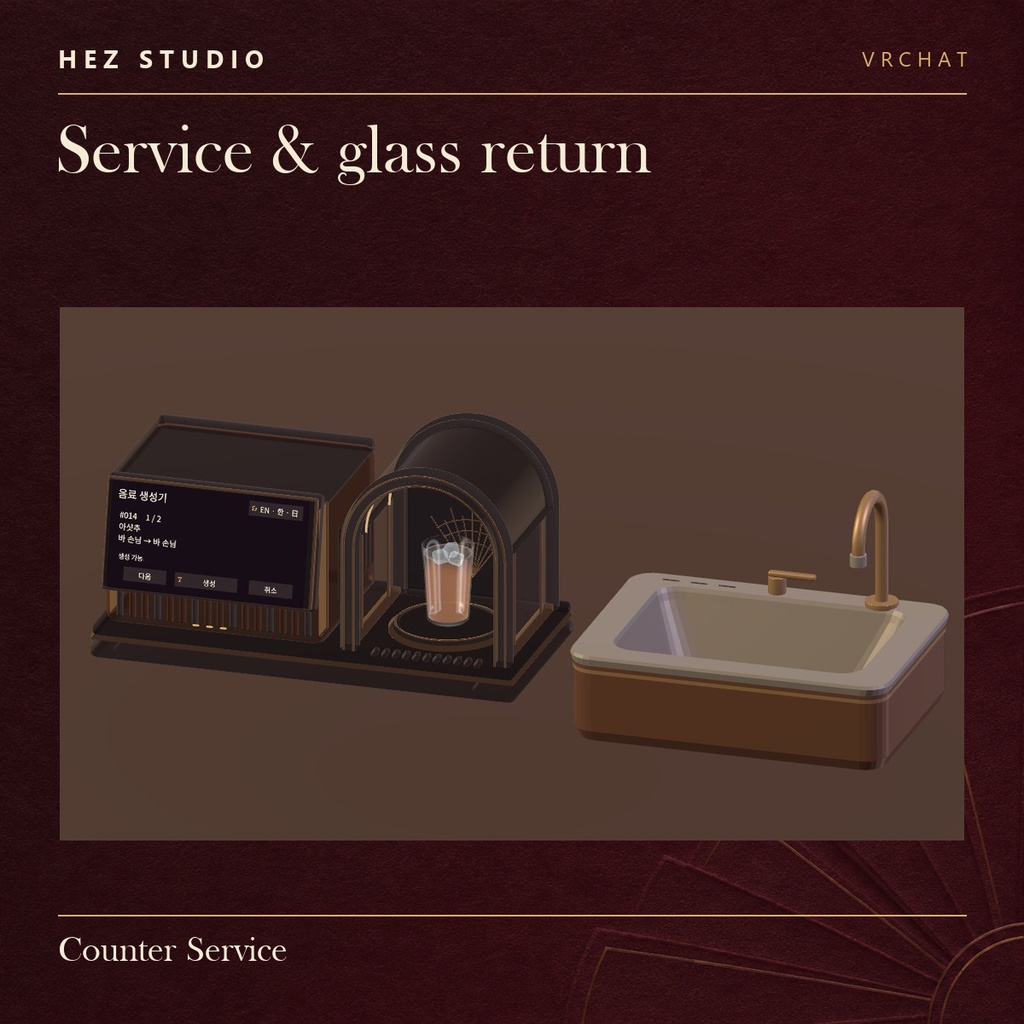
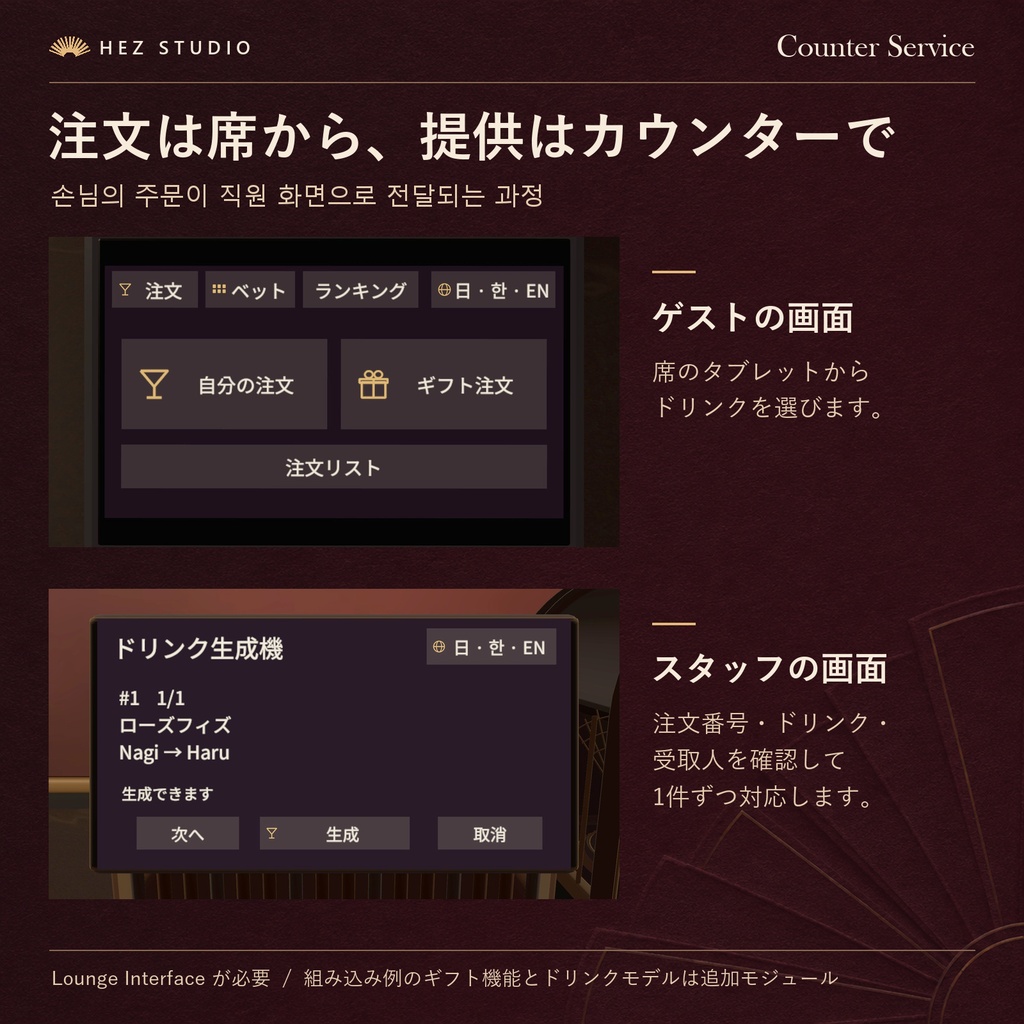
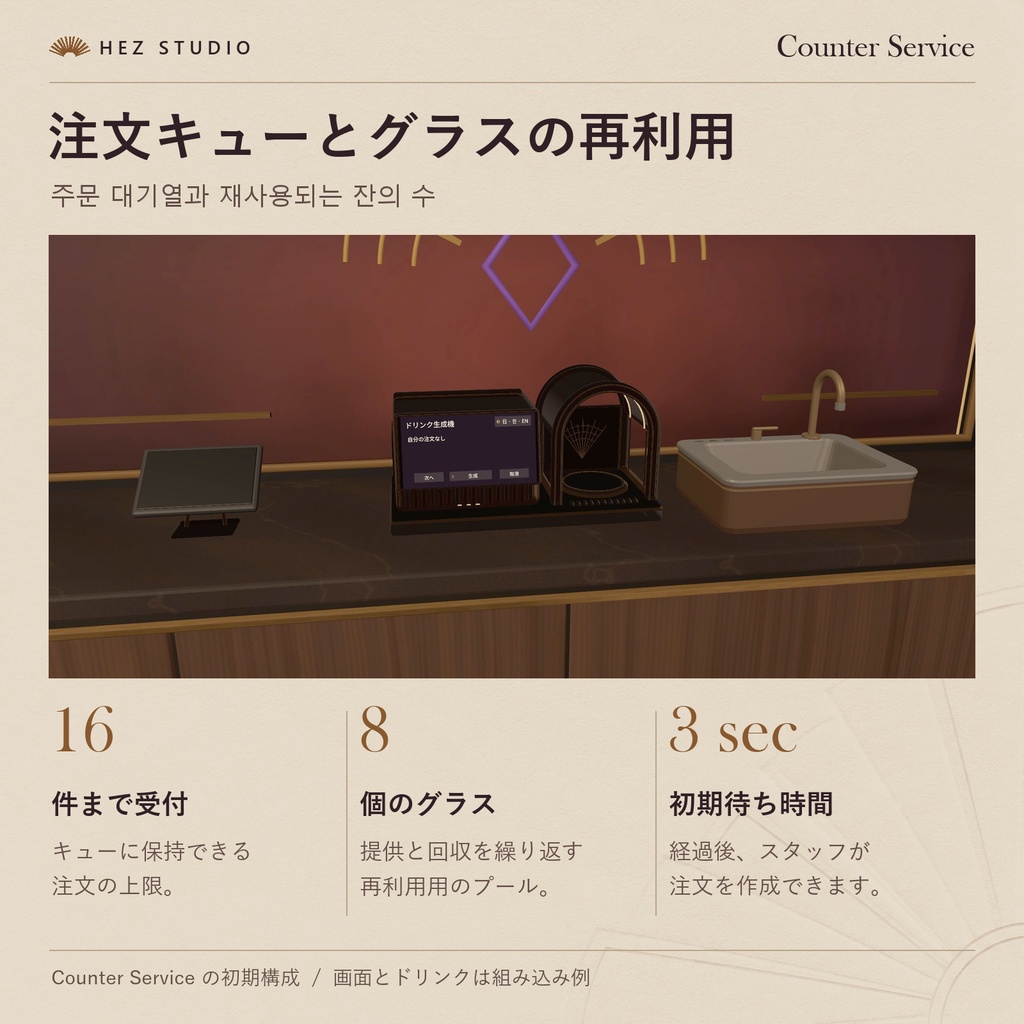
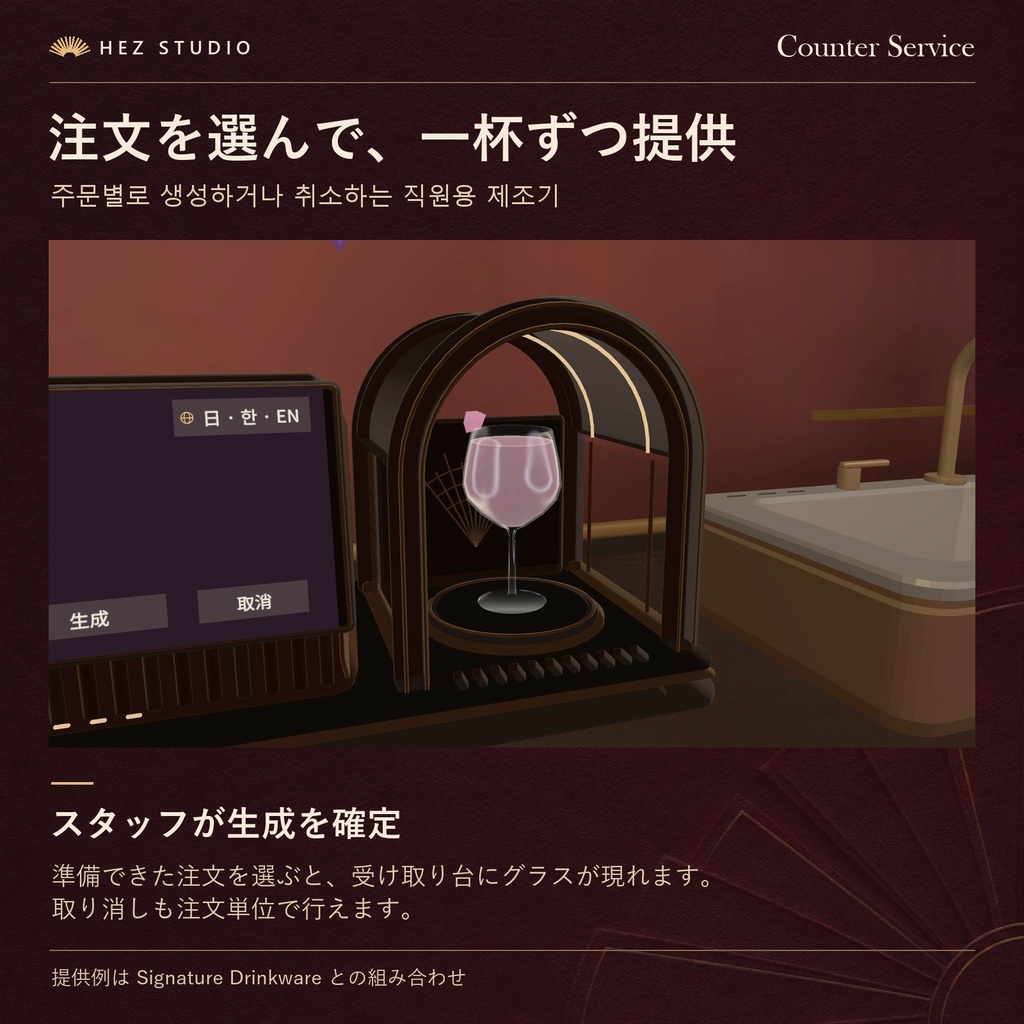
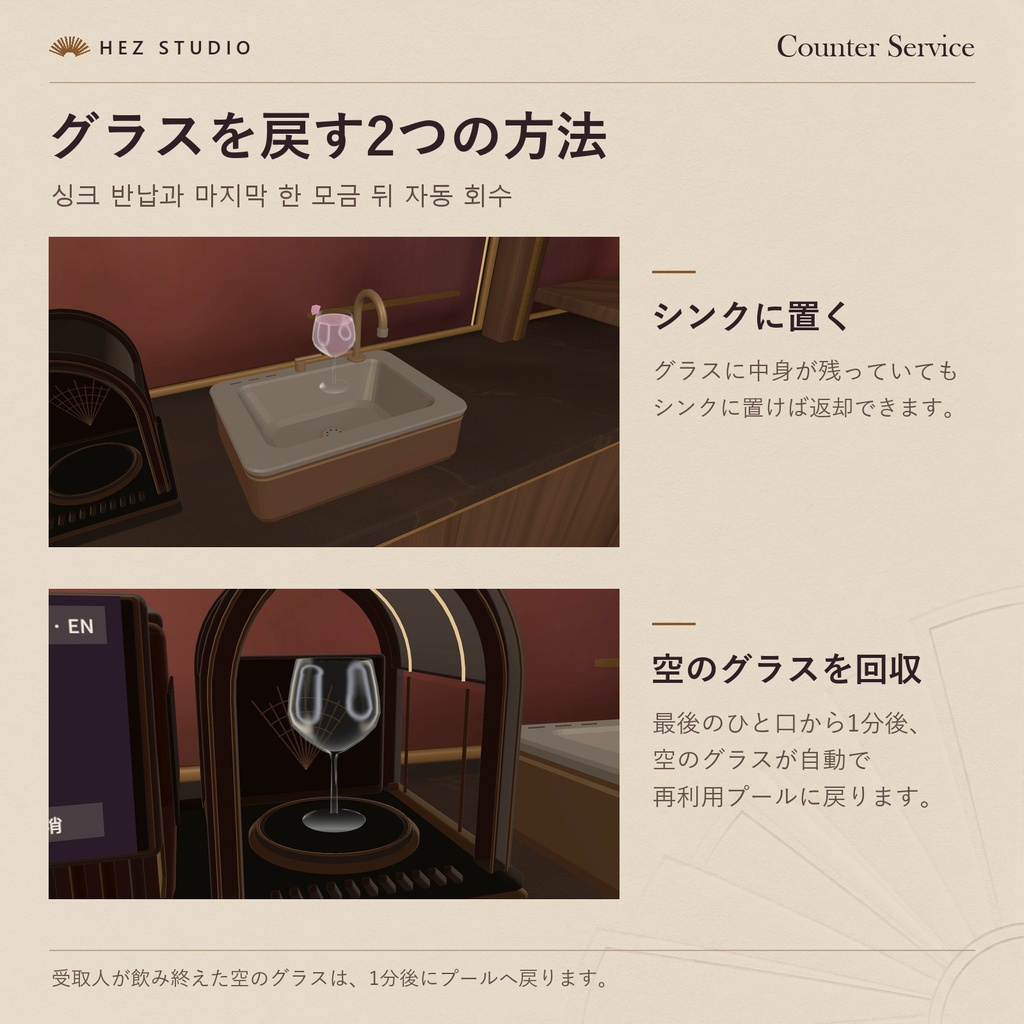
【日本語】 「ご注文のドリンクをお持ちしました。」 VRChatのバーやカフェで、注文受付からスタッフによるドリンクの準備・提供、グラスの返却まで楽しめる接客システムです。 お客様が席のタブレットからドリンクを注文すると、カウンター内のスタッフ用端末に注文番号と受取人が表示されます。 スタッフが注文を選んで提供を確定すると、完成したドリンクが受け渡し台に現れます。 グラスを手に取ってお客様の席まで運び、直接手渡すところまで、VRChatならではの接客体験を楽しめます。 ■ ご購入前に v0.1.1では、席のタブレットに加えて、縦型キオスクからも注文できます。同じCounter Serviceに接続すると、どちらの端末でも同じメニュー、チップ残高、注文状況を確認できます。 スタッフが注文を確認してドリンクを準備する方式のため、バーやカフェでのロールプレイや接客イベントに適しています。 【必須アセット】 ・Lounge Interface v0.1.1(無料) https://hezdqma.booth.pm/items/9195389 新規導入・v0.1.0からの更新ともに、先にLounge Interface v0.1.1をインポートし、その後にCounter Service v0.1.1をインポートしてください。この2点で基本の注文から提供まで利用できます。 25種類のドリンクやギフト注文などは、別売の拡張商品で追加できます。 ■ 主な機能 【ドリンク注文】 ・お客様用の注文タブレット ・注文番号と受取人の表示 ・最大16件の注文を受付 ・スタッフによる注文の確認・提供・キャンセル 【スタッフによる提供】 ・スタッフ用ドリンク準備端末 ・提供確定時にドリンクを生成 ・バーの受け渡し台にグラスを配置 ・スタッフがお客様へ直接手渡し可能 【ドリンク・グラス】 ・基本グラス2種類を収録 ・標準プレハブで32個のグラスを繰り返し使用 ・Useを押している間、ドリンクの中身が減少 ・空のグラスは60秒後に自動回収 ・飲みかけのグラスも返却シンクで即時回収 【グラスの再利用】 グラスは使い捨てではなく、プール内のオブジェクトを繰り返し使用します。 使用済みグラスの自動回収と返却シンクにより、イベント中のグラス管理をサポートします。 ■ 収録内容 ・お客様用注文タブレット ・縦型9:16のキオスク用注文画面(Kiosk Screen.prefab) ・注文待ちモニター(編集用Blenderファイル付き) ・スタッフ用ドリンク準備端末 ・ドリンク受け渡し台 ・グラス返却シンク ・基本グラス2種類 ・注文・提供・グラス管理システム ※ 25種類のドリンクメニューは別売のSignature Drinkwareで追加できます。 ■ 対応する拡張アセット 【HEZ Kiosk — キオスク筐体】 本商品には注文画面が付属します。筐体には自作モデルを使うか、別売のHEZ Kiosk「モデル単体」をお選びください。「Counter Service Edition」には筐体・Counter Service・Lounge Interfaceがすべて含まれます。 https://hezdqma.booth.pm/items/9207789 【Signature Drinkware — ¥900】 ドリンク25種類・器8種類を追加できます。 カクテル、コーヒー、ソフトドリンクなどを使って、バーやカフェのメニューを充実させたい方向けです。 https://hezdqma.booth.pm/items/9195393 【Guest Gifts — ¥200】 同じインスタンスにいるフレンドへ、ドリンクをプレゼントできる拡張機能です。 注文時に受取人を指定し、スタッフが用意したドリンクを相手に届けられます。 https://hezdqma.booth.pm/items/9195395 【Roulette & Chips】 ルーレットとチップベット機能を追加できます。 Counter Serviceと連携するExtension版では、対応ドリンクによる抽選確率ブーストも利用できます。 https://hezdqma.booth.pm/items/9195397 ■ 導入方法 Lounge Interface v0.1.1(無料)をインポート https://hezdqma.booth.pm/items/9195389 Counter Service v0.1.1をインポート UnityのシーンにCounter Serviceプレハブを配置 注文タブレットとスタッフ用端末を設置 キオスクを使う場合は、画面中央のScreenAnchorと、注文を受けるCounter Serviceをシーン内で選択し、GameObject → HEZ STUDIO → Connect kiosk screen を実行してください。 詳しい導入手順は付属のSTART-HERE.txtをご確認ください。 ■ 完成ワールドについて ドリンク注文、ギフト、ルーレットなどをまとめて導入したい方には、フルセットをご用意しています。 Salon HEZ Casino Lounge Full https://hezdqma.booth.pm/items/9195383 ワールド本体と全7モジュールを収録。各システムを接続済みの完成シーンも含まれており、追加購入なしで導入できます。
【한국어】
"주문하신 음료 나왔습니다." VRChat 바와 카페에서 음료 주문부터 직원의 제조·제공, 잔 반납까지 경험할 수 있는 접객 시스템입니다. 손님이 좌석의 태블릿으로 음료를 주문하면 바 카운터 안쪽의 직원용 단말기에 주문 번호와 수령인이 표시됩니다. 직원이 주문을 선택하고 제공을 확정하면 완성된 음료가 수령대에 나타납니다. 직접 잔을 들고 손님의 자리까지 이동해 음료를 전달하는 과정까지 VRChat에서 즐길 수 있습니다. ■ 구매 전 확인 사항 v0.1.1부터 좌석 태블릿과 세로형 키오스크에서 모두 주문할 수 있습니다. 같은 Counter Service에 연결한 단말기는 메뉴, 손님의 칩 잔액, 주문 대기열을 공유합니다. 직원이 주문을 확인하고 음료를 준비하는 방식이므로 바와 카페의 접객 RP 및 이벤트 운영에 적합합니다. 【필수 에셋】 ・Lounge Interface v0.1.1 (무료) https://hezdqma.booth.pm/items/9195389 처음 설치하거나 v0.1.0에서 업데이트할 때는 Lounge Interface v0.1.1을 먼저 임포트하고 Counter Service v0.1.1을 임포트하세요. 이 두 패키지로 기본 주문부터 음료 제공까지 이용할 수 있습니다. 음료 25종과 선물 주문 등의 기능은 별도 확장 상품으로 추가할 수 있습니다. ■ 주요 기능 【음료 주문】 ・손님용 주문 태블릿 ・주문 번호 및 수령인 표시 ・최대 16건 주문 대기 ・직원의 주문 확인·제공·취소 【직원 음료 제공】 ・직원용 음료 준비 단말기 ・제공 확정 시 음료 생성 ・바 수령대에 완성된 잔 배치 ・직원이 직접 손님에게 전달 가능 【음료 및 잔】 ・기본 잔 2종 포함 ・기본 프리팹에서 잔 32개를 재사용 ・Use를 누르고 있는 동안 음료 내용물 감소 ・빈 잔은 60초 후 자동 회수 ・마시던 잔도 반납 싱크대에서 즉시 회수 【잔 재사용】 잔은 매번 새로 생성하는 대신 오브젝트 풀을 통해 반복 사용합니다. 자동 회수와 반납 싱크대를 이용해 이벤트 중 잔 관리를 편리하게 할 수 있습니다. ■ 포함 구성 ・손님용 주문 태블릿 ・9:16 세로형 키오스크 주문 화면(Kiosk Screen.prefab) ・주문 대기열 모니터와 편집용 Blender 파일 ・직원용 음료 준비 단말기 ・음료 수령대 ・잔 반납 싱크대 ・기본 잔 2종 ・주문·제공·잔 관리 시스템 ※ 음료 25종 메뉴는 별도 판매하는 Signature Drinkware를 통해 추가할 수 있습니다. ■ 연동 가능한 확장 에셋 【HEZ Kiosk — 키오스크 본체】 이 상품에는 주문 화면이 포함됩니다. 본체는 직접 만든 모델을 사용하거나 별도 판매하는 HEZ Kiosk의 Model Edition을 선택하세요. 키오스크의 Counter Service Edition에는 본체, Counter Service, Lounge Interface가 모두 포함됩니다. https://hezdqma.booth.pm/items/9207789 【Signature Drinkware — ¥900】 음료 25종과 용기 8종을 추가할 수 있습니다. 칵테일, 커피, 무알코올 음료 등 다양한 메뉴를 구성하고 싶은 바·카페 제작자에게 적합합니다. https://hezdqma.booth.pm/items/9195393 【Guest Gifts — ¥200】 같은 인스턴스에 있는 친구에게 음료를 선물할 수 있는 확장 기능입니다. 수령인을 지정해 주문하고, 직원이 준비한 음료를 상대방에게 전달할 수 있습니다. https://hezdqma.booth.pm/items/9195395 【Roulette & Chips】 룰렛과 칩 베팅 기능을 추가할 수 있습니다. Counter Service 연동형 Extension에서는 대응 음료에 따른 당첨 확률 부스트 기능도 이용할 수 있습니다. https://hezdqma.booth.pm/items/9195397 ■ 설치 방법 Lounge Interface v0.1.1(무료) 임포트 https://hezdqma.booth.pm/items/9195389 Counter Service v0.1.1 임포트 Unity 씬에 Counter Service 프리팹 배치 주문 태블릿과 직원용 단말기 설치 키오스크를 사용할 때는 씬에서 화면 중앙의 ScreenAnchor와 주문을 받을 Counter Service를 함께 선택한 뒤 GameObject → HEZ STUDIO → Connect kiosk screen을 실행하세요. 자세한 설치 방법은 동봉된 START-HERE.txt를 참고해 주세요. ■ 완성형 월드 패키지 음료 주문, 선물, 룰렛 등을 한 번에 설치하고 싶다면 다음 상품을 확인해 주세요. Salon HEZ Casino Lounge Full https://hezdqma.booth.pm/items/9195383 월드 본체와 모듈 7종, 연결 완료된 씬을 포함하고 있어 별도 추가 구매 없이 설치할 수 있습니다.
【English】
"Your drink is ready." A drink ordering and staff service system for VRChat bars and cafés. Guests place orders using a tablet at their seats. The order number and recipient appear on the staff terminal behind the bar. Staff select an order and confirm preparation to spawn the finished drink at the service station. Pick up the glass, carry it to the guest, and deliver it personally for an interactive bartending and hospitality experience. ■ Before Purchasing With v0.1.1, guests can order from a portrait kiosk as well as a table tablet. Terminals connected to the same Counter Service share the menu, each guest’s chip balance and the order queue. It is designed for VRChat bars, cafés, roleplay venues and social events where staff personally prepare and serve drinks. 【Required Asset】 ・Lounge Interface v0.1.1 (free) https://hezdqma.booth.pm/items/9195389 For a new installation or an upgrade from v0.1.0, import Lounge Interface v0.1.1 first, then Counter Service v0.1.1. These two packages cover the full ordering and serving process. Additional drink presets and gift ordering can be added through optional extensions. ■ Main Features 【Drink Ordering】 ・Guest ordering tablet ・Order number and recipient display ・Queue for up to 16 orders ・Staff-controlled preparation and cancellation 【Staff Service】 ・Staff drink preparation terminal ・Spawn drinks after staff confirm preparation ・Service station for prepared glasses ・Allow staff to carry and personally deliver drinks 【Drinks & Glasses】 ・Two basic glass styles included ・32 reusable glasses in the standard prefab ・Hold Use to gradually empty a drink ・Automatic collection 60 seconds after a glass becomes empty ・Immediate return through the sink, including partially consumed drinks 【Reusable Glass Management】 Glasses are managed through a reusable object pool rather than creating new objects for every order. Automatic collection and a return sink help manage glasses during events. ■ Included Contents ・Guest ordering tablet ・9:16 portrait kiosk ordering screen (Kiosk Screen.prefab) ・Order queue monitor with editable Blender source ・Staff preparation terminal ・Drink service station ・Glass return sink ・Two basic glass styles ・Ordering, serving and glass management systems ※ The extended 25-drink menu is available separately through Signature Drinkware. ■ Optional Extensions 【HEZ Kiosk — kiosk model】 Counter Service includes the ordering screen. Mount it on your own model or choose the separately sold HEZ Kiosk Model Edition. The kiosk’s Counter Service Edition bundles the model, Counter Service and Lounge Interface in one purchase. https://hezdqma.booth.pm/items/9207789 【Signature Drinkware — ¥900】 Adds 25 drinks and eight vessel styles. Expand your menu with cocktails, coffee, soft drinks and more. https://hezdqma.booth.pm/items/9195393 【Guest Gifts — ¥200】 Adds the ability to order a drink for a friend in the same instance. Select a recipient when ordering, and let staff prepare and deliver the drink. https://hezdqma.booth.pm/items/9195395 【Roulette & Chips】 Adds roulette and chip betting functionality. The Extension version integrates with Counter Service and supports drink-based probability boosts for eligible drinks. https://hezdqma.booth.pm/items/9195397 ■ Installation Import Lounge Interface v0.1.1 (free) https://hezdqma.booth.pm/items/9195389 Import Counter Service v0.1.1 Place the Counter Service prefab in your Unity scene Set up the guest tablets and staff terminal To connect a kiosk, select the ScreenAnchor at the center of its display and the Counter Service that should receive its orders. Choose GameObject → HEZ STUDIO → Connect kiosk screen. See the included START-HERE.txt for detailed installation instructions. ■ Complete World Package For creators who want a complete world with drink ordering, gifting, roulette and other integrated features: Salon HEZ Casino Lounge Full https://hezdqma.booth.pm/items/9195383 Includes the world base, all seven modules and a fully connected scene. No additional purchases are required.
-
━━━━━━━━━━━━━━━━━━━━ 動作確認環境 / 검증 환경 / Tested With ━━━━━━━━━━━━━━━━━━━━ Windows PC Unity 2022.3.22f1 · Built-in Render Pipeline VRChat Worlds SDK 3.10.6 (UdonSharp) ━━━━━━━━━━━━━━━━━━━━ 配布形式 / 배포 형식 / Download ━━━━━━━━━━━━━━━━━━━━ HEZ-CounterService-v0.1.1.zip · .unitypackage START-HERE.txt (日本語 / 한국어 / English) ━━━━━━━━━━━━━━━━━━━━ 公開体験ワールド / 공개 체험 월드 / Public Demo World ━━━━━━━━━━━━━━━━━━━━ HEZ STUDIO Showroom